
Mac Pro 2019 Memory: What Fits, What Doesn't, and the 12x32GB Reality
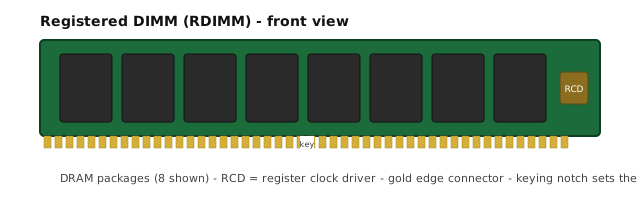
Short answer: the 2019 Mac Pro takes DDR4-2933 ECC RDIMM in twelve slots arranged as two per channel across six channels. Buy a matched kit rather than loose modules, buy 32GB modules if you might ever grow, and only buy the maximum configuration if you can name the workload today that needs it. Unbuffered desktop memory will not work in this machine at all.
What the 2019 Mac Pro actually accepts
The 2019 Mac Pro — MacPro7,1 — uses DDR4-2933 ECC registered DIMMs. Three properties matter and they are not interchangeable:
- Registered (RDIMM), not unbuffered. This is the single most common purchase mistake. Desktop DDR4 is unbuffered, and unbuffered modules do not initialise in this platform. It is not a performance question, it is a does-not-boot question.
- ECC. The platform expects error-correcting modules. Non-ECC registered modules exist in the market and are not the right part here.
- 2933 MT/s (PC4-23400). Slower grades generally run, at their own speed and below the platform ceiling. Faster grades have no headroom to give, because the platform runs memory at 2933.
The platform does not support LRDIMM or 3DS RDIMM. That matters because it caps the practical ceiling well below what the slot count alone would suggest — see the next section.
Why the twelve slots do not mean "any capacity you like"
Twelve slots sounds like a great deal of headroom. In practice the capacity ceiling is set by module density and the platform's memory controller, not by slot count.
The configurations that matter for this machine are built from 16GB and 32GB dual-rank RDIMMs:
| Slots filled | Module | Total | Channels active |
|---|---|---|---|
| 6 of 12 | 16GB | 96GB | 6 (one module per channel) |
| 6 of 12 | 32GB | 192GB | 6 |
| 12 of 12 | 16GB | 192GB | 6 (two per channel) |
| 12 of 12 | 32GB | 384GB | 6 (two per channel) |
Note the middle pair: six 32GB modules and twelve 16GB modules both land on 192GB, and both fill all six channels. Which to choose is a decision about what comes next, not about today's number. Twelve 16GB modules leave you no slots to upgrade into; six 32GB modules leave six slots free to reach 384GB later with a second six-module kit.
The matched-kit question
You can buy six loose 32GB modules from a market tray. The machine will usually post. What you give up is any assurance that the set was validated together.
Modules from different production lots can differ in die revision and in the SPD data the module presents to the controller. On a platform that trains memory timings per channel, that can show up as a channel training down to a slower set of timings, or in the worst case as a failed memory initialisation that only appears under a particular population.
A matched kit means the same module type, same rank, same speed grade, same lot, tested as a set in the target slot population before it ships. That is what we supply, and it is why our Mac Pro configurations are sold as 6x16GB, 6x32GB, 12x16GB and 12x32GB rather than as loose quantities.
The four configurations we supply
All four are DDR4-2933 ECC RDIMM matched kits, quoted per order:
- 6x16GB = 96GB — six modules, six of twelve slots. The sensible starting configuration for editing, music and development.
- 6x32GB = 192GB — six modules, six of twelve slots. The one to buy if you expect to grow, because it leaves half the slots free.
- 12x16GB = 192GB — twelve modules, all slots filled. Same capacity as above, no upgrade path.
- 12x32GB = 384GB — twelve modules, all slots filled. The maximum of the configurations we supply.
Every kit ships with lot photos and a test report. Because these are quoted against physical lots rather than from a list price, ask Ms Aya for current availability, or send the configuration you need and we prepare a written quote against the lot.
When 96GB is the right answer — and 384GB is the wrong one
We would rather tell you this than sell you the bigger kit.
Buy the smaller configuration if your work is editing, colour grading, audio production, software development, or running one or two virtual machines. In these workflows the bottleneck is almost never memory capacity. It is storage throughput, or GPU. Putting the difference into fast external storage changes how the machine feels far more than doubling RAM does.
Buy the larger configuration if you can name the workload that needs it today — several concurrent VMs each with a large allocation, very large local caches that must stay resident, or multi-stream high-bitrate video pipelines. If you cannot name it today, you are buying capacity you will not use before the machine is replaced.
The trap is buying 384GB "so it lasts." Memory is the wrong place to park that instinct: by the time capacity is your constraint, the modules and the machine will both be older, and the money spent early bought nothing in the meantime.
Adding a second kit later
The clean upgrade path is a second identical kit into the six free slots. Some notes on doing it well:
- Keep module type, rank and speed grade identical. Do not mix a 16GB kit with a 32GB kit across channels if you care about the result being reproducible.
- Populate the free slot in each channel, not the next six slots by number. The slots are two per channel across six channels; getting this wrong leaves channels idle and costs bandwidth.
- Re-run your own memory check afterwards. Do not assume that because it posts it is well.
How to verify what you have
Before ordering, confirm the existing population so the new kit matches it. In macOS: About This Mac → System Report → Memory. You are looking for the module size, the speed, and whether the report says ECC. If it reports a speed below 2933 across all modules, that is worth investigating before you add anything — it usually means a mixed population or a channel training down.
If you are buying to fill an empty machine, there is nothing to match and any of the four configurations above will do the job.
Pulled, refurbished or new — what to buy for a Mac Pro
Whichever you choose, ask for the lot photographs and the test report before the lot ships. Inspection in Shenzhen is welcome if you are local.
Send us the configuration
Tell us which of the four configurations you need, or send your existing population and we will tell you the cleanest way to reach your target. Quotations are issued in writing against the lot we supply, with lot photos and a test report attached.
Common Questions
Can I put ordinary DDR4 desktop memory in a 2019 Mac Pro?
No. The 2019 Mac Pro (MacPro7,1) requires ECC registered DIMMs (RDIMM), not the unbuffered UDIMMs used in desktop PCs. Unbuffered modules will not initialise in this platform. It also has no support for LRDIMM or 3DS RDIMM classes.
Should I buy a matched kit or six loose modules?
Buy a matched kit if the machine has to be right first time. Loose modules from different lots can have different die revisions and SPD settings; the platform will usually post, but you give up any assurance that the set was validated together. A matched kit is the same modules, same lot, tested as a set in the target configuration.
What happens if I fill only six of the twelve slots?
The machine runs, but you lose channels. The twelve slots are arranged as two per channel across six channels. Filling six slots correctly - one per channel - keeps all six channels active at half capacity. Filling them by slot number instead can leave you with three or four channels populated, which costs bandwidth on memory-bound work.
Can I add a second kit later to double capacity?
Usually yes, if you keep the same module type, rank and speed grade, and populate the remaining channel slot. Mixing 16GB and 32GB modules across the channels is supported at reduced capacity in most configurations, but the cleaner upgrade is a second identical kit. If you think you may grow, buy 32GB modules now - six of them leaves room to reach 384GB later.
Is 384GB worth it, or is 192GB enough?
Only buy 384GB if you can name the workload that needs it - large local caches, several concurrent VMs with big memory allocations, or 8K and multi-stream video pipelines. For editing, music production and general development, 96GB or 192GB is the better spend, and the money saved buys faster storage, which changes performance far more in those workflows.
What are your minimums for Mac Pro memory?
Mac Pro 2019 kits are quoted per order rather than from a list price, because the lot and condition grade change what we can supply. Send the configuration you need (6x16GB, 6x32GB, 12x16GB or 12x32GB) and we will quote against the lot we supply from Shenzhen, with lot photos and a test report before shipment.
Ask Ms Aya about availability, or tell us the part you need if it is not listed.
 Ms Aya