Sourcing guide: how to specify server memory and HBM
This guide sets out the six checks we run before quoting a memory or HBM line, in the order that matters. It reflects how parts are actually labelled on the modules in our own stock, and it is written so that a buyer can verify each point against the goods on arrival.
1. Identify the module form factor your platform accepts
Registered DIMM (RDIMM) and Load-Reduced DIMM (LRDIMM) are built for server platforms whose memory controller expects a registered module. Unbuffered DIMM (UDIMM) serves desktop and workstation platforms, and Small Outline DIMM (SODIMM) serves laptops. This is the first check because it is the one that cannot be corrected later: a registered module placed in a platform that expects unbuffered memory will not train at all, regardless of capacity or speed.
2. Match the speed grade, not just the capacity
DDR4 speed appears in two equivalent notations on the same label. The data rate is written as
DDR4-2933; the bandwidth designation for that same grade is PC4-23400.
A module rated higher than the platform maximum will normally down-clock, while a module rated lower
caps the speed of the whole channel. Confirm the supported grade before fixing the capacity, since
capacity is the easier of the two to change when building a kit.
3. Choose rank and device width for the required density
Rank and device width are printed together in the form 2Rx4: the leading number is
the rank count and the trailing number is the bit width of each DRAM device. Increasing rank count
raises the achievable module density, but it also places more electrical load on the memory bus.
That trade-off is why very densely populated servers sometimes require LRDIMM in place of RDIMM even
when the capacity per module is identical.
4. Count the slots and populate them as a kit
Server and workstation platforms ship with a fixed slot count and a published population order. The Mac Pro 2019, for example, provides twelve memory slots and is commonly populated six or twelve modules at a time; kits are quoted against those slot counts so that the modules in a shipment come from a matched batch rather than being assembled from mixed sources.
5. Read HBM by generation, stack height and density
HBM is specified along three axes at once. The generation — HBM2, HBM2e, HBM3 or HBM3e — sets the
interface and the bandwidth class. The stack height, written 8-Hi or 12-Hi,
states how many DRAM dies are stacked in one device. Density per stack follows from those two: within
the same generation a 12-Hi stack carries more dies and therefore more capacity than an 8-Hi stack —
24GB against 16GB at HBM3, and 36GB against 24GB at HBM3e. Because generation and stack height
together determine both capacity and bandwidth, neither number is meaningful on its own.
6. Confirm the exact part number and condition before ordering
Two modules of equal capacity and equal speed can still differ in three ways that matter: the vendor part number, the OEM service part number printed alongside it, and the condition of the goods. Condition is recorded as new, refurbished, or pulled-and-tested, and it is stated per line rather than per order. Recording both the part number and the stated condition at quotation time is what makes it possible to check a delivery against the offer.
How HBM stacks are organised
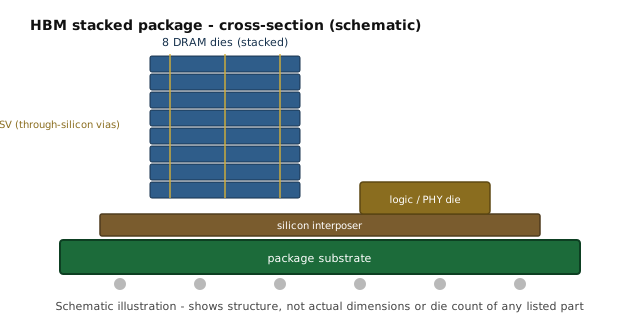
The diagram below shows the structure referenced in step five: DRAM dies stacked vertically and connected through vertical vias, sitting on an interposer layer. Stack height counts those dies, which is why a 12-Hi device carries more capacity than an 8-Hi device of the same generation.
Common questions
Can RDIMM and UDIMM be mixed in the same platform?
No. Registered and unbuffered modules use different signalling, and a platform supports one or the other rather than both. Servers with a registered memory controller take RDIMM or LRDIMM; desktop and workstation platforms take UDIMM. Mixing the two kinds within one channel is not a supported configuration.
Will a module rated above the platform speed simply down-clock?
In most cases a module rated above the platform maximum runs at the platform maximum rather than at its own rated speed, so the extra rating goes unused. A module rated below the platform maximum caps the channel at its own lower speed. That asymmetry is why the supported speed grade is settled before capacity is chosen.
What does 8-Hi or 12-Hi mean on an HBM part?
It is the number of DRAM dies stacked inside one HBM device. Within one generation a taller stack holds more dies and therefore offers more capacity per stack: at HBM3 an 8-Hi stack reaches 16GB and a 12-Hi stack reaches 24GB, while at HBM3e those same two stack heights reach 24GB and 36GB. Generation and stack height together determine the capacity — neither figure is meaningful alone.
Why is HBM quoted on request while some memory lines show a price?
HBM pricing moves with generation, stack height and quantity, so a single published figure would be misleading. Those lines are quoted individually against the requested specification and quantity. Registered DDR4 lines, where the configuration is fixed, carry published prices instead.
What condition are the modules supplied in?
Condition is stated per line rather than per order and appears on the quoted line itself. Lines are supplied as new, refurbished, or pulled-and-tested, and the recorded condition is what a delivery can be checked against. Availability is confirmed per order rather than displayed as a live stock figure.
How this applies to our stock
Our current lines cover DDR4 registered memory for server and workstation platforms and HBM across four generations, from HBM2 through HBM3e, in 8-Hi and 12-Hi stacks. HBM and other lines quoted on request are priced individually because stack height, generation and quantity all move the number; the DDR4 registered lines carry published prices. Availability is confirmed per order rather than shown as a live figure.
Last reviewed: 2026-09-27 · This guide is checked against our current stock list whenever lines are added.