
Home / Server memory /
Mac Pro 2019 Memory Kits — What Apple Actually Supports
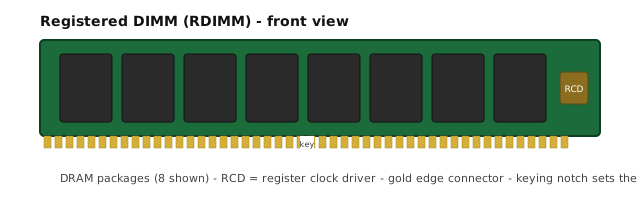
The 2019 Mac Pro runs Intel Xeon W processors on a twelve-slot memory subsystem: twelve DIMM slots across six channels, two slots per channel, filled in channel pairs. Apple supports DDR4 ECC R-DIMM or LR-DIMM modules at 2933 MHz, 288-pin, full-length, and states plainly that the two module types cannot be mixed — mixing R-DIMM and LR-DIMM triggers the memory error indicator rather than a graceful downgrade.
Module capacities run 8, 16, 32, 64 and 128 GB, so a single module tops out at 128 GB. The machine ceiling depends on the processor: Apple documents 768 GB on the 8-core (at 2666 MHz) and on the 12- and 16-core, and 1.5 TB on the 24- and 28-core, which requires all twelve slots populated. Apple's factory configurations use R-DIMM up to 192 GB (6 x 32 GB) and LR-DIMM from 384 GB (6 x 64 GB) upward.
Two practical notes that decide whether an upgrade works first time: Apple supports 4, 6, 8, 10 or 12 populated DIMMs (6 or 12 being optimal, with a single DIMM reserved for diagnostics), and all modules at the same capacity give the best performance — with mixed capacities, a 32 GB module must sit in the first slot of each channel pair. Heatsinked DIMMs are not supported.
How each configuration sits against Apple's own documentation
- 96 GB as 6 x 16 GB R-DIMM
- This is an Apple factory configuration: Apple lists 96 GB as 6 x 16 GB. Six of twelve slots are populated, one module per channel, leaving the second slot of each channel free for a later upgrade to 12 modules. Source: Apple: Mac Pro (2019) technical specifications — support.apple.com/118461
- 192 GB as 6 x 32 GB R-DIMM
- Also an Apple factory configuration (192 GB = 6 x 32 GB), and the largest R-DIMM option Apple shipped at that capacity point; 384 GB and above moved to LR-DIMM. Source: Apple: Mac Pro (2019) technical specifications — support.apple.com/118461
- 192 GB as 12 x 16 GB R-DIMM
- Same 192 GB total built from smaller modules across all twelve slots. Apple documents 12 populated DIMMs as a supported slot count, but 12 x 16 GB is not one of Apple's listed factory combinations — we state that rather than imply factory endorsement. Source: Apple: Mac Pro (2019) memory specifications and slot population — support.apple.com/101639
- 384 GB as 12 x 32 GB R-DIMM
- 384 GB using twelve 32 GB R-DIMMs. Apple's own 384 GB configuration used 6 x 64 GB LR-DIMM; the R-DIMM route keeps the whole machine on the R-DIMM side of Apple's no-mixing rule, which matters when the rest of the build is already R-DIMM. Source: Apple: Install or replace memory in Mac Pro (2019) — support.apple.com/102742
Stock lines in this family
No line currently listed in this family.
Sources
- Apple: Install or replace memory in Mac Pro (2019) — support.apple.com/102742
- Apple: Mac Pro (2019) memory specifications and slot population — support.apple.com/101639
- Apple: Mac Pro (2019) technical specifications — support.apple.com/118461
Every figure on this page is traceable: statements taken directly from official sources, and derived numbers (stack counts from published bus widths, capacity per stack from published totals) are marked as derived in the text. Facts checked 30 Sep.
Look up a part number in the cross-reference or ask us for a quote.
 Ms Aya